
Document Tag Types
Customizing Tag Types
- InnDoc AI allows users to define custom Tag Types to extract relevant data based on organizational needs.
- To set up custom tag types, follow these steps: Navigate to Settings → Tags → Tag Types → Add
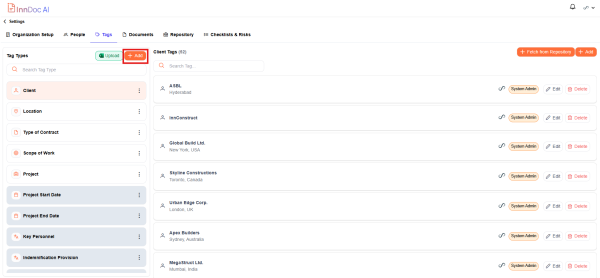
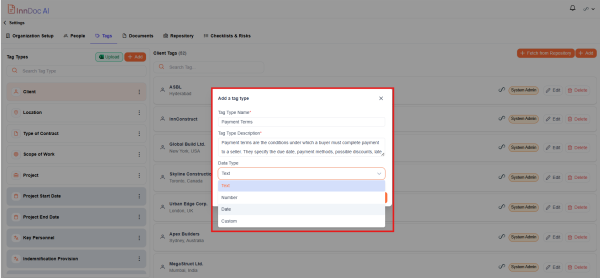
- The following details are required to create custom tags
- Tag Type Name (e.g., "Contract Expiry Date")
- Tag Type Description (Brief explanation of the tag’s purpose)
- Data Type (Choose from Text, Number, or Date)
Further, Tag Types can be linked to specific document types to ensure accurate data extraction from relevant documents. This ensures that only appropriate tags are applied to specific document categories.
Video Reference - https://app.guidde.com/share/playbooks/hHunP6f7f2gMf4W7KWuUns?origin=CLhuhyWU58WFuigCugTh3i3jhGs2
Updated 9 months ago
Did this page help you?