
People Tracker
PeopleTracker provides a comprehensive view of individual progress within a specific project. It allows project managers to monitor contributions and ensure accountability.
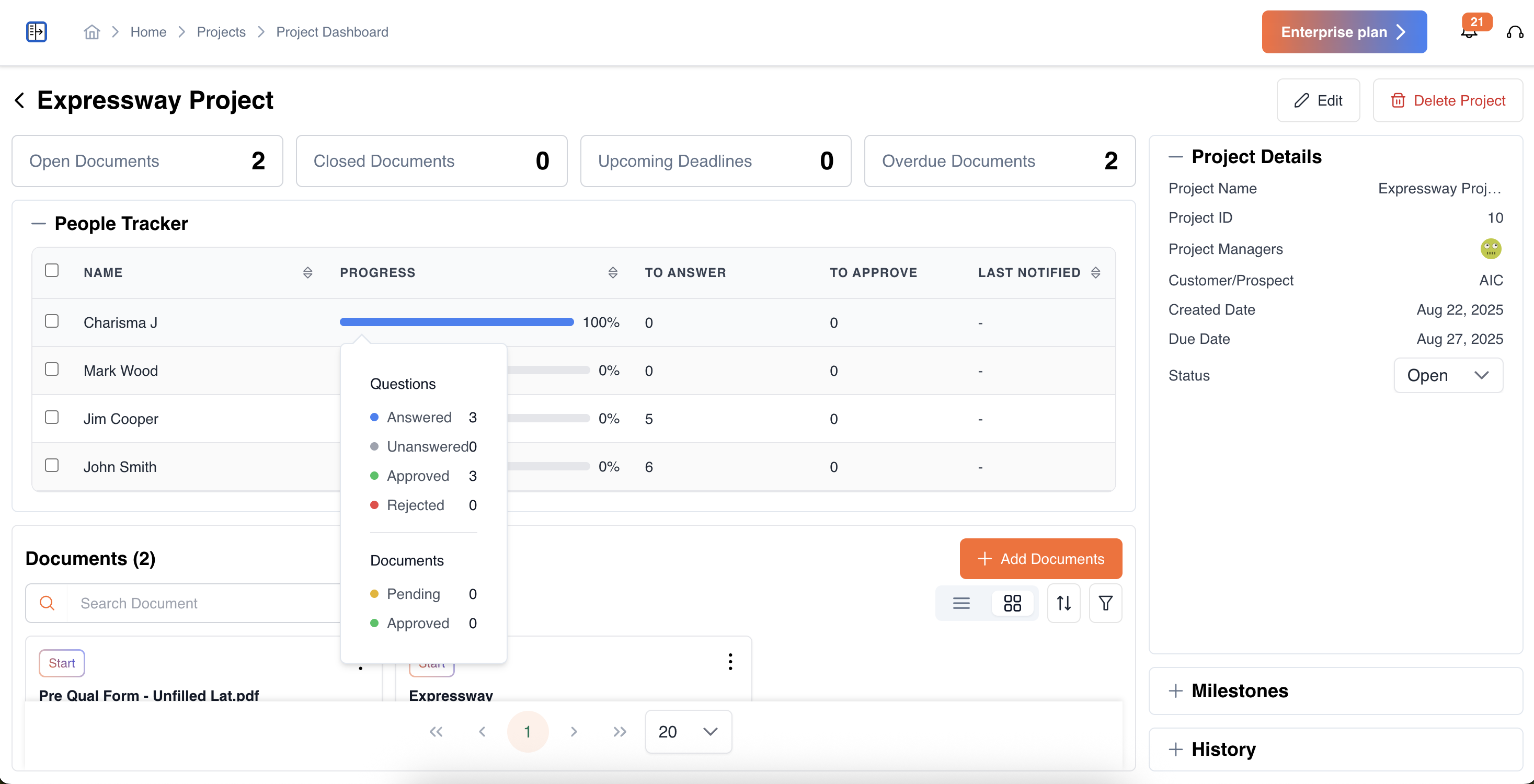
- Team Member List: View all members assigned to the project.
- Progress Tracker: Quickly see the overall progress of each team member.
- Hover over the progress bar to view detailed statistics:
- Answered questions: Represents the total number of questions that a team member has provided answers for within the project.
- Unanswered questions: Represents the total number of questions assigned to the team member that have not yet been answered.
- Approved items: Out of the answered questions or documents, this shows the number of items that have been reviewed and approved.
- Rejected items: Out of the answered questions or documents, this shows the number of items that have been reviewed and rejected, requiring revisions or further attention.
- Pending documents: Documents assigned to the team member that are awaiting action or approval.
- Approved documents: Documents that the team member has already approved.
- Hover over the progress bar to view detailed statistics:
- To Answer / To Approve:
- To Answer: Lists all questions the team member is responsible for answering.
- To Approve: Lists all documents or questionnaires that require their approval.
- Last Notified: View the timestamp of the last reminder sent to the member.
- Reminders: Send custom reminders to team members directly from the tracker to prompt completion or approval of assigned tasks.
Updated 11 months ago
Did this page help you?