
User Onboarding
InnDoc AI enables seamless collaboration by allowing Admins to onboard users efficiently through an email invitation process.
Steps to Onboard a User
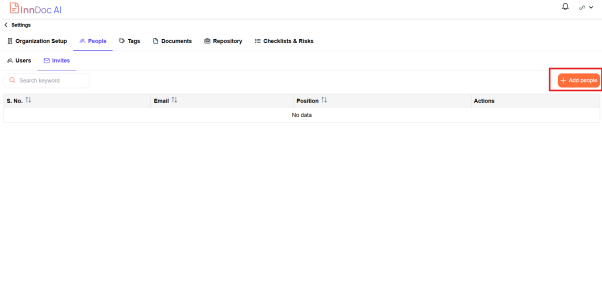
- Navigate to Settings → People → Invites
- Click on "Add People" to initiate the onboarding process
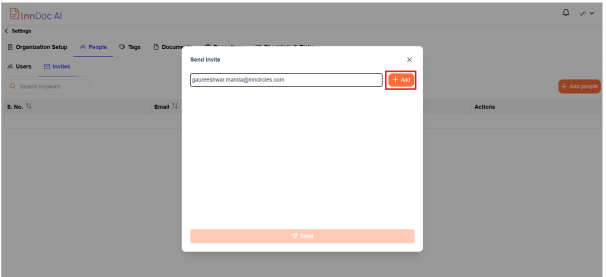
- Enter the email address of the user being invited and Click “+ Add”
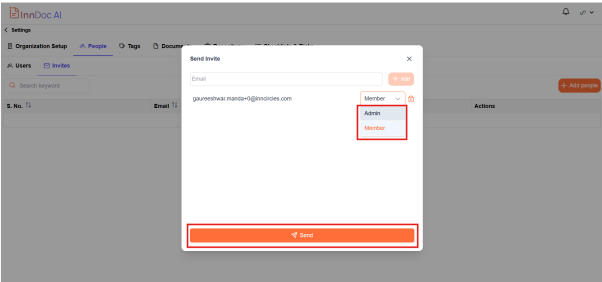
- Select the user role (Admin or Member) based on their required level of access and click "Send" to dispatch the invitation email
User Invitation & Registration
- The invited user will receive an email with an invitation to join InnDoc AI
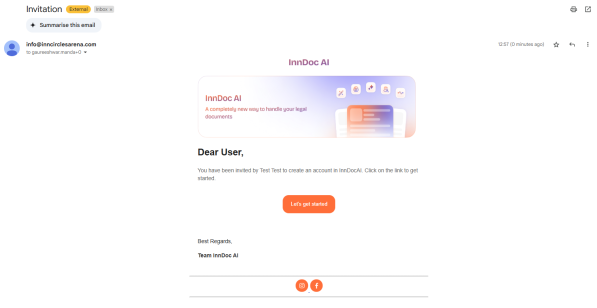
- Click on "Let’s Get Started" to begin the onboarding process
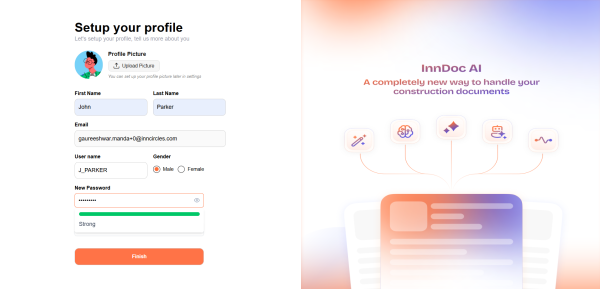
- User is redirected to the “Profile Setup”
- Provide personal details such as:
- Profile Picture
- First Name & Last Name
- Email Address & Username
- Create a secure password for logging into the InnDoc AI account
- Click "Finish" to complete the profile setup
Upon successful onboarding, users are navigated into InnDoc AI , A guided walkthrough will assist new users in understanding the platform’s features and functionalities
Video Reference -
https://app.guidde.com/share/playbooks/oJHpiiqHvdURSsjmoVUoRG?origin=CLhuhyWU58WFuigCugTh3i3jhGs2
Updated 9 months ago
Did this page help you?